Admin week ahead
See next week’s desk bookings and when your office may need extra support.
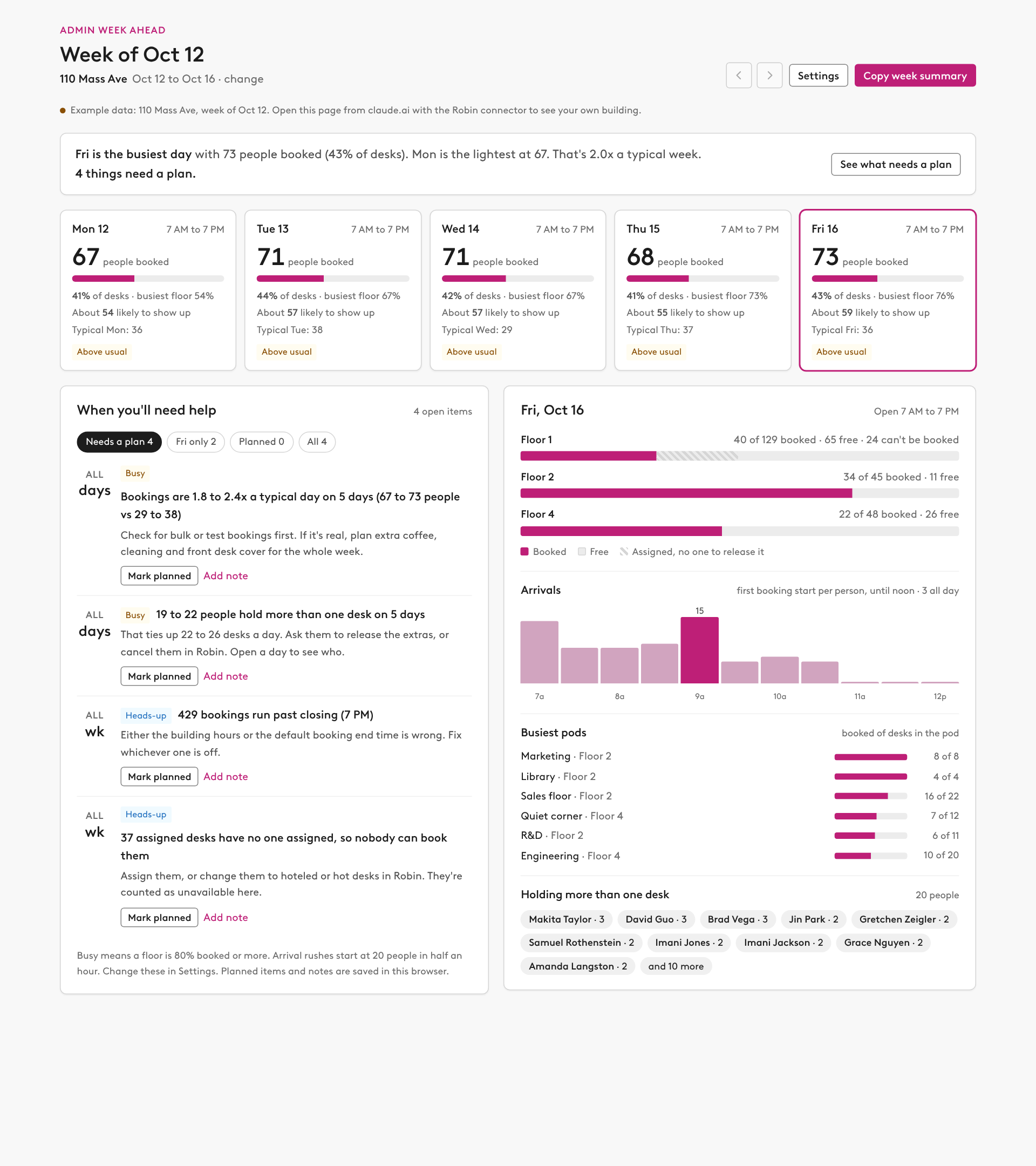
Prompt
Build me a "week ahead" page from Robin for a workplace admin, using our design system. Start with my default building and next week (this week if it's Monday to Friday); don't ask me which.

What to pull
- get_current_user_info for my default building, and get_office_locations so I can switch buildings.
- get_location_levels, then find_desks for each floor with desks (desk id, name, pod, desk types, assignee count). Skip disabled desks.
- get_building_hours for Monday to Friday.
- check_desk_availability for every desk on each floor, with one window per open day from opening to closing in the building's time zone. Stay under 100 desks and 750 desk-windows per call, and skip days that have already ended. From each desk read its reservations (person, start, end) and, if it has none and can't be booked, the first unbookable reason.
- execute_scenario_planning_metric avg_desks_used_per_day for the last 4 completed weeks, grouped by floor, day and checked in. Use it for "a typical Monday" and for the share of bookings that usually check in. If it's refused, leave those parts out and say so.

What to show
- A one-line headline: the busiest and lightest day, how the week compares with a typical week, and how many things need a plan.
- Five day cards: people booked, percent of desks booked, busiest floor, about how many are likely to show up (bookings times the usual check-in rate, never more than the people booked), the typical number for that weekday, and a label: Quiet, Normal, Above usual, Busy or Full. Clicking a card opens that day.
- The day panel: each floor as a bar (booked, free, and desks nobody can book), arrivals by half hour from each person's first booking until noon, the busiest pods, and anyone holding more than one desk.

When I'll need help
Turn the numbers into a short list, each item with the day, what's happening and what to do:
- A floor at or above the busy threshold (80% by default): send walk-ins to the floor with the most free desks.
- A day 1.5x or more above a typical one: check for bulk or test bookings before staffing up.
- An arrival rush (20 or more people starting in the same half hour by default): put someone at reception and the elevators.
- People holding more than one desk: how many desks that ties up, and to release the extras.
- Bookings on a closed day, bookings that run past closing, and assigned desks with no one assigned (nobody can book them).
- When the same flag shows up on three or more days, combine it into one item for the week.
Let me mark each item planned, add a short note, and filter by needs a plan, this day, planned or all. Keep the thresholds in a settings panel. Save planned items, notes and settings in this browser only.

Data Robin may add later
If the Robin connector offers any of these, add them and say which ones were found. If it doesn't, skip them without comment and don't add placeholders or manual entry for them:
- Upcoming meetings or room bookings: list next week's meetings by day. Flag important ones by title, size (20 or more people), external guests or executives, and meetings in rooms on busy floors. Add the room, the organizer and the time.
- Visits: expected visitors by day and hour, VIPs, groups of five or more, visitors with no host, and visitors arriving during an arrival rush.
- Deliveries: expected volume by day, large or signature-required items, and anything uncollected for more than two days.
- Activities: catering, cleaning, events and maintenance on the day view. Flag anything that lands on a busy day or blocks a floor.
- Tickets: open tickets by building and due date, overdue tickets, and tickets on a floor or room that's booked next week.
- Meeting services: services (catering, AV, room setup) attached to next week's meetings. Flag anything unconfirmed and anything due before the building opens.
Put each one in the help list with the same day, what and what-to-do format.

Live updates and sharing
- Give the page live access to the Robin connector with the mcp capability, using the connector's exact display name (for example "Robin (Workplace)"), and only the tools above. Never call a tool that changes a booking.
- Let me move between weeks (not before this week) and switch buildings. If a call fails, keep the last data and show the problem in the status line.
- A "Copy week summary" button that opens a plain-text summary for Slack or email: each day, what needs a plan and what's planned.
- Without the connector, show example data and say so.