Split team detector
Find teams spread across floors and explore ways to bring them together.
Prompt
Using the Robin connector, build an interactive split team detector for every office in my organization. Publish it as an artifact using our design system. Do not change anything in Robin.

Pull the data (last 30 completed days)
1. List every office location and read each building overview for floors and active desks. Leave out floors with no desks and non-workspace floors (parking, garage, lockers, labs, test or example). Skip buildings with one workspace floor.
2. For each building, run "average desks used per day" grouped by floor and day, and grouped by floor and department.

Calculate per building
- Spike days: building total more than double its median and at least 20 desks above it. Leave them out and list them.
- Each floor's typical day (median) and peak day.
- Team desks per floor: split the floor's typical day by each department's share of bookings on that floor. A team's total is the sum over floors.
- Split team: a team at or above a minimum size (default 5 desks a day) that uses at least a floor threshold (default 2 desks) on two or more floors. Main floor is where it books most; away desks are the rest.
- Proposed floor: going through split teams biggest first, pick the first floor the team already uses that has room for the rest of it. Room is the floor's desks times a maximum peak utilization (default 85%) minus its peak day, updated as teams move in and out. If no floor fits, propose the main floor and show how many desks it is short.

Build the page
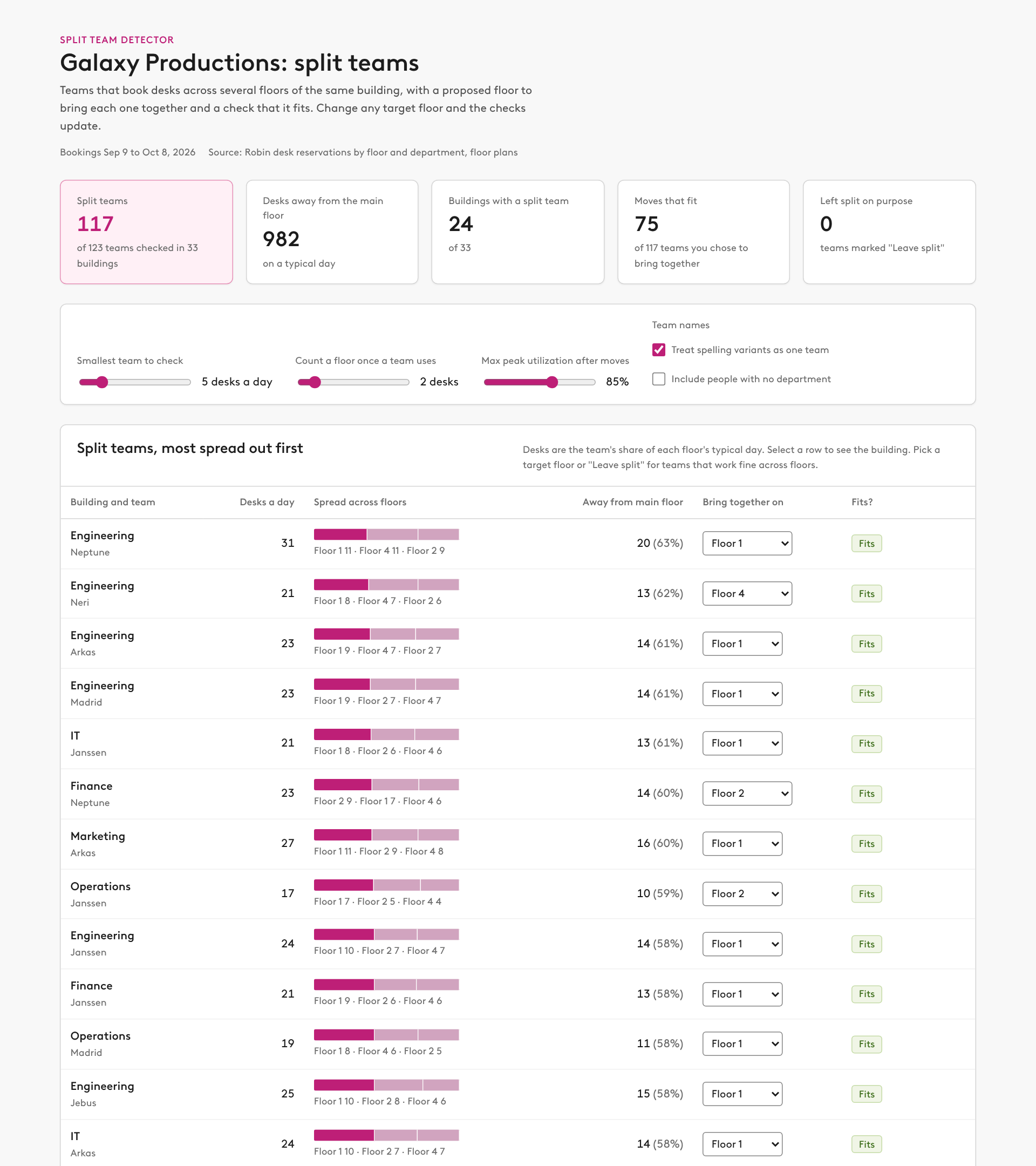
- Summary row: split teams out of teams checked, desks away from the main floor, buildings with a split team, moves that fit, and teams left split on purpose.
- Controls: smallest team to check, floor threshold, max peak utilization, "treat spelling variants as one team" (on by default, e.g. Sales and sales), and "include people with no department" (off by default). Every control recalculates.
- A table of split teams, most spread out first: team and building, desks a day, a bar of its spread across floors with the main floor highlighted, desks away from the main floor, a dropdown to pick the floor to bring it together on (or "Leave split"), and a fits or short-by-N tag. Changing a dropdown rechecks the whole building.
- A building view with a picker: "Today" and "After bringing teams together" stacks side by side, one bar per floor sized by desks with a segment per team (top 8 teams colored, the rest gray), the selected team outlined, the limit marked, and each floor's peak utilization.
- A "Copy prompt for this building" button. The prompt lists each team to bring together with its current floors and target floor, then asks Claude to check against current seat assignments and neighborhoods, create a stack plan and allocation, and build a NEW unpublished draft with one neighborhood per team on its target floor (moving assigned people if there are any). Review and give me the link. Do not publish.
- A "How this works" section that explains each calculation.

Rules
- Say this works from bookings (including no-shows), so it finds teams that sit apart in practice, and that the prompt checks seat assignments before drafting.
- Report teams and floors only. Do not list individual people.