Portfolio right-sizing scorecard
Compare buildings by desk use and capacity to find consolidation opportunities.
Prompt
Using the Robin connector, build an interactive portfolio right-sizing scorecard for every office in my organization. Publish it as an artifact using our design system.

Pull the data
1. List every office location. For each one, read the building overview to get active desks by floor and booking type (assigned, hotel, hot).
2. Leave out floors that are not workspace, such as parking, garage, lockers, labs, and test or example floors. List what you left out.
3. For each building, run "average desks used per day" grouped by day for the last 30 completed days. This gives desks booked per day.
4. Run the same metric grouped by day and by checked in. The checked-in rows give desks checked into per day. If a building returns no rows or you have no planning access, keep it in the list and mark it as having no data.

Calculate for each building, once for booked desks and once for checked-in desks
- Workspace desks: active desks on the floors you kept.
- Typical day: the median of the daily values.
- Peak day: the highest daily value, after leaving out bulk-booking spikes (any day more than double the median and at least 20 desks above it). List the spike days you left out.
- Typical and peak utilization: typical day and peak day divided by workspace desks.
- Days booked: days with any desk booking, out of the weekdays in the window.
- Check-in rate: total checked-in desk-days divided by total booked desk-days. If a building has bookings but no check-ins at all, treat check-in as not in use there and do not score it on the checked-in measure.
- Could release: workspace desks minus (peak day divided by a target peak utilization). Default the target to 85% and never go below zero.
- Status from peak utilization: under 40% is a consolidation candidate, 40 to 70% has room to tighten, 70 to 90% is right-sized, 90% or more is running tight. Buildings with fewer than 10 booking days are "not enough data" and are not scored.

Build the page
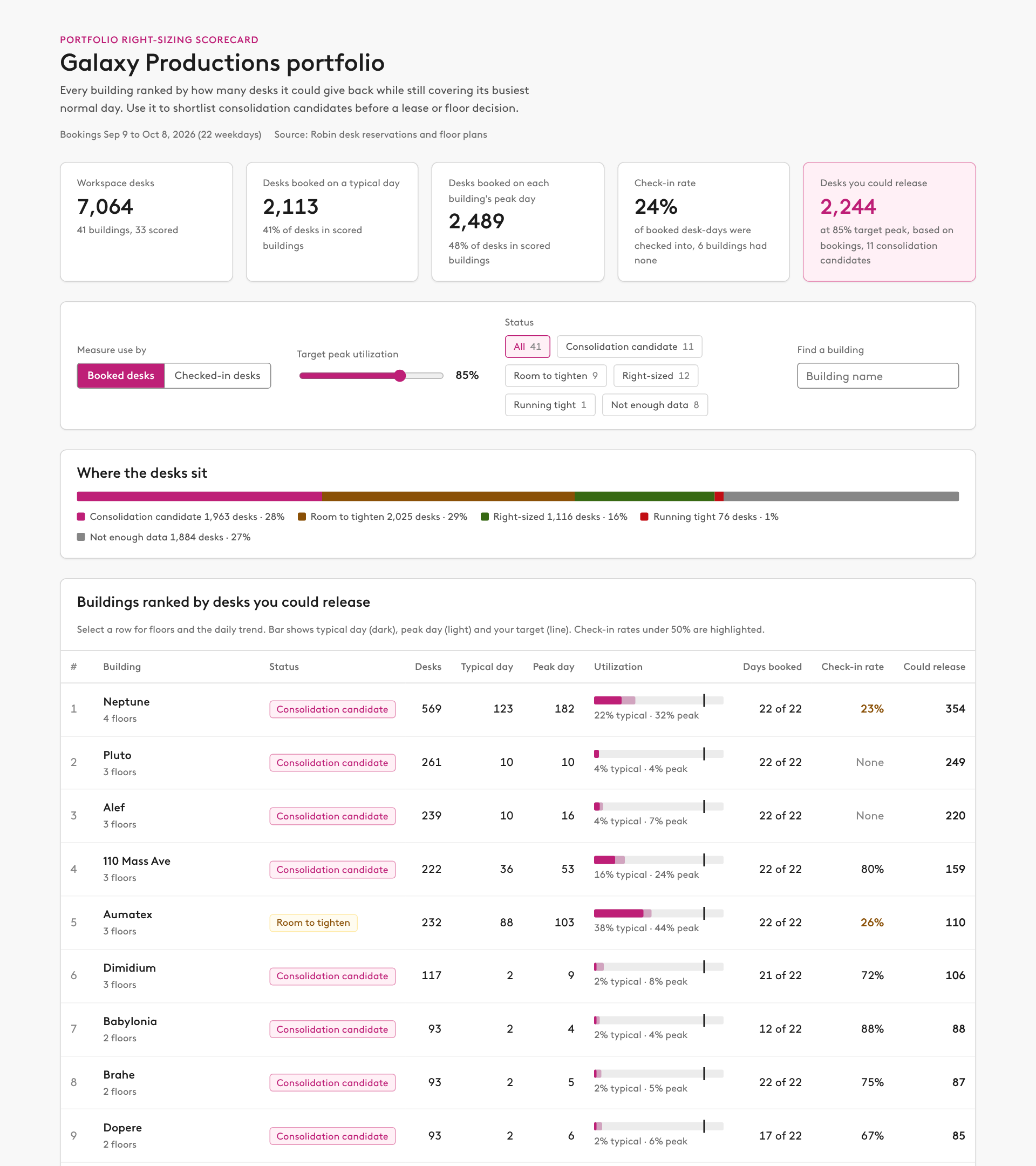
- Summary row: total workspace desks, desks used on a typical day, desks used on each building's peak day, the portfolio check-in rate, and desks you could release at the target.
- Controls: a toggle to measure use by booked desks or checked-in desks (default to booked) that recalculates everything, a slider for target peak utilization (60 to 95%) that recalculates everything, status filter chips with counts, and a building search.
- A stacked bar showing how many desks sit in each status.
- A table ranked by desks you could release, with sortable columns: building, status, desks, typical day, peak day, a utilization bar (typical, peak, and a target marker), days booked, check-in rate (highlight anything under 50%), and could release.
- Selecting a row expands it to show floors with their desk-type mix, a small daily chart with booked and checked-in lines, the target line, and excluded spike days marked, and one sentence on what the building could give back.
- A "How to read this" section that explains each calculation, and a "Data notes" section listing excluded floors, buildings with no desks, and any building whose floor totals do not match its desk count.

Rules
- Say that booked desks include no-shows, and that a low check-in rate can mean no-shows or desks where check-in is not required, which is common for assigned desks.
- Report buildings and floors only. Do not show individual names.
- If headcount per building is not available, say so rather than estimating it.