Live office signage
Show live desk availability on an office screen and let people book open desks.
Prompt
Build a full-screen office signage board from Robin for a lobby or floor screen, using our design system. It should look good on a 1920x1080 TV and still work on a laptop. Start with my default building and its first floor with desks; don't ask me which.

What to pull, every refresh
- Today's hours with get_building_hours. If the building is closed or past closing, say so on the screen.
- Every desk on the floor with find_desks (desk name, pod), once per floor.
- Today's bookings with check_desk_availability on all desks, in chunks of 100, from now until closing in the building's time zone. Read each desk's reservation (name, start time) and whether it's bookable. Count hot desks with no booking as free for walk-ups.
- Building and floor choices from get_office_locations and get_location_levels. Skip floors with no desks.

The screen
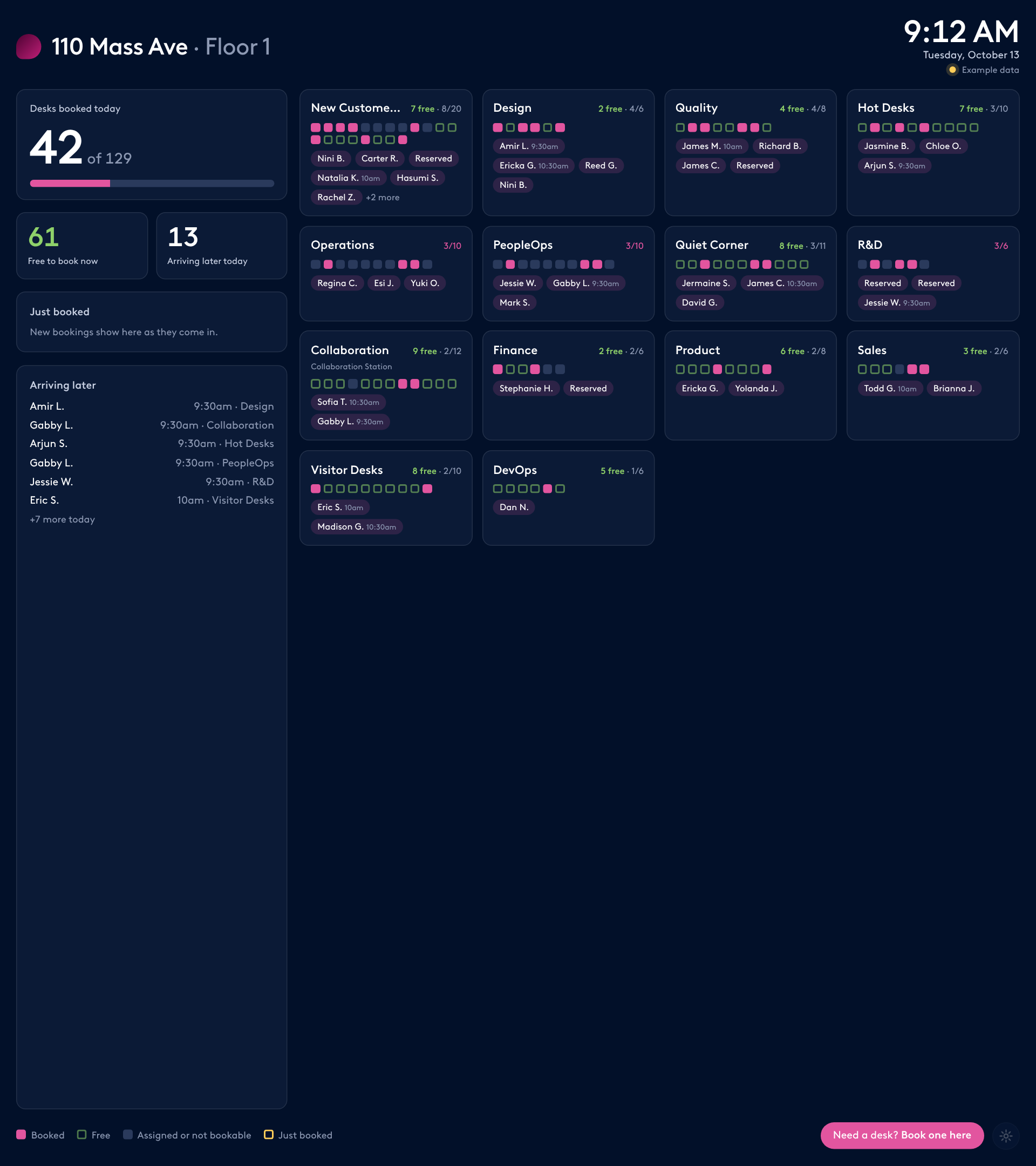
- Header: building and floor, a large clock and date in the building's time zone, and a status line (live and when it last updated, example data, or the error).
- Left column: desks booked today out of total with a bar, free to book now, how many are arriving later today, a "Just booked" feed, and an "Arriving later" list with times.
- Main area: one tile per pod, busiest first. Each tile shows its free count and booked out of total, a row of small squares for its desks (booked, free, or assigned and not bookable), and the people booked there with their arrival time if it's later than now.
- Footer: a legend, a "Need a desk? Book one here" button and the settings gear.
- Dark theme by default for screens, with a light option. No page scrolling on a TV: if the pods don't fit, show fewer names per pod rather than cutting tiles off.

Live updates
- Give the page live access to the Robin connector with the mcp capability, using the connector's exact display name (for example "Robin (Workplace)"), and only these tools: get_office_locations, get_current_user_info, get_location_levels, get_building_hours, find_desks, check_desk_availability, find_people, book_desk.
- Refresh every 5 minutes by default. Compare reservation ids with the last refresh and highlight new bookings for 30 minutes, in the feed, the pod's squares and the person's name.
- If a call fails, keep showing the last good data and put the problem in the status line.

Booking from the screen
- Tapping a pod with free desks, or the "Book one here" button, opens an overlay: pick a free desk (that pod's, or all pods), then who it's for: the account signed in on the screen, or someone found with find_people.
- Book from now until closing. Run check_desk_availability first (with the person's user id when booking for someone else), then book_desk with the bookAs type it returns and forUser set to their email. Say that booking for others needs delegate permission in Robin, and show Robin's reason if a desk can't be booked.
- After booking, mark the desk booked and highlight it as new straight away. Never book without a tap on the confirm button.

Settings and privacy
- A gear that appears when the mouse moves opens settings: building, floor, how to show names (full name, first name and last initial, initials, or counts only), refresh every 2, 5 or 10 minutes, and theme. Save them on that screen only.
- Default to first name and last initial. Show "Reserved" for private bookings (visibility JUST_ME) and never their names. Suggest "Counts only" for public lobbies.
- If the connector isn't available, show example data and say so, with a button to preview how a new booking is highlighted. Booking in example mode shows what would happen and says nothing was sent to Robin.