Current-state stack plan
See where teams sit today and explore a better floor plan.
Prompt
Using the Robin connector, build an interactive stack plan for [building name] that shows where each team is today, flags what looks off, and lets me move teams between floors. Publish it as an artifact using our design system. Do not change anything in Robin.

Pull the data (last 30 completed days)
1. Read the building's current plan through its live state: each floor's desks by type (assigned, hotel, hot), neighborhoods and any seat assignments. Also read the building overview so you can compare the plan with the live floor plan, and tell me if they differ (seats, neighborhoods, desk types).
2. Run "average desks used per day" grouped by department and day for the building, and grouped by floor and department.
3. Get headcount per department for the organization.
4. Find bulk-booking days: days where the building's desk bookings jump to more than double the median. Leave them out of team sizes and list them.

Calculate
- Typical day and peak day for each department: the median and the highest daily value on normal days.
- Teams seen only on bulk-booking days: size them from their bulk-day count and mark them "confirm size".
- Desks needed: typical or peak day plus a buffer (default peak day plus 10%). Let me override any team's number.
- Today's layout: spread each team's desks needed across the floors it books, in proportion to its bookings on each floor. If seat assignments exist, use those instead and say so.

Build the page
- Header with two buttons: "Copy stack plan prompt" and "Copy draft prompt". Nothing on the page writes to Robin.
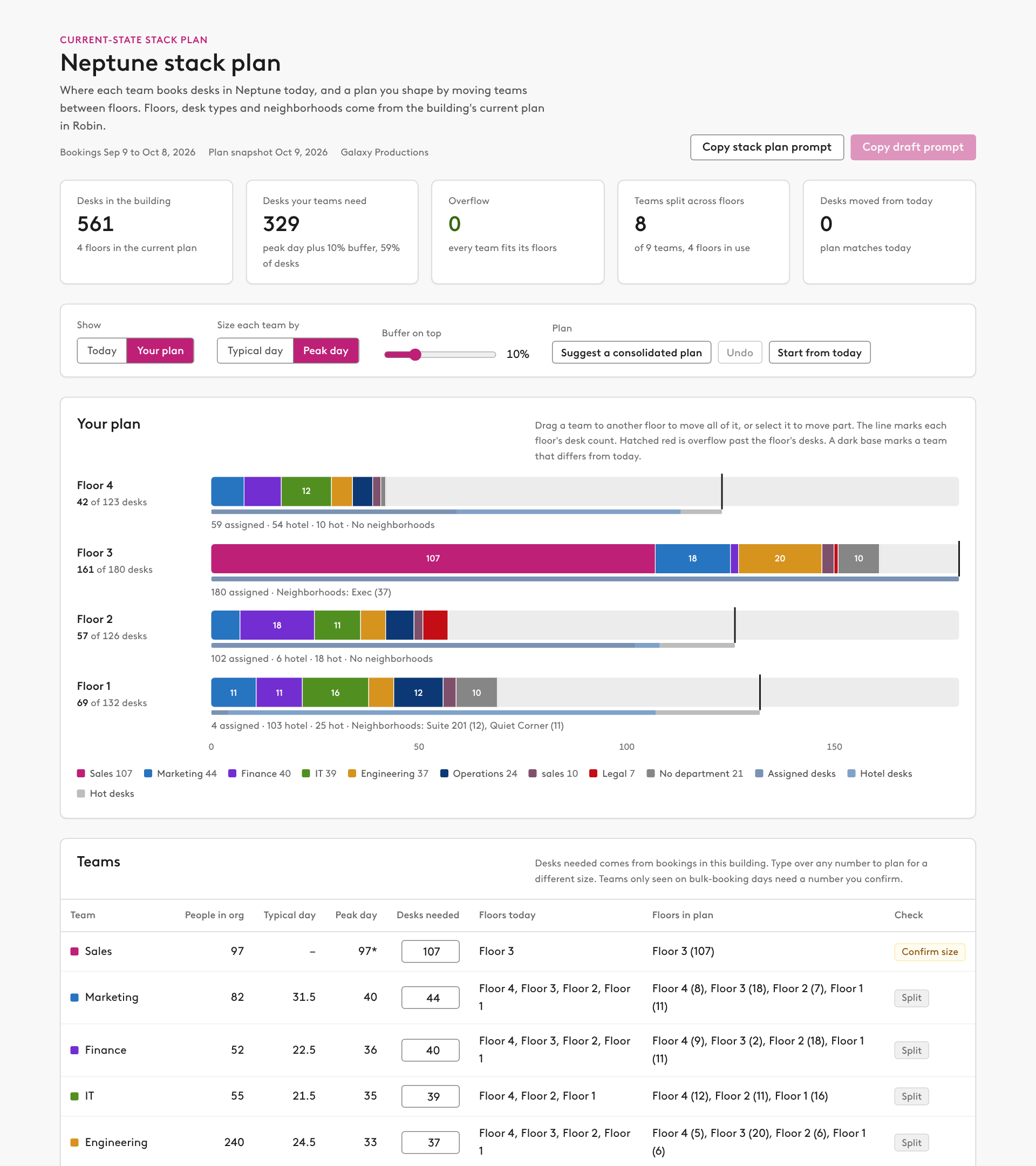
- Summary row: desks in the building, desks teams need, overflow past floor capacity, teams split across floors, and desks moved from today.
- Controls: Today or Your plan, size by typical or peak day, a buffer slider (0 to 40%), and buttons for "Suggest a consolidated plan", Undo and "Start from today".
- Stack chart: one row per floor, top floor first. Each bar has one colored segment per team with its desk count, a line at the floor's desk count, hatched red for overflow past it, a thin band showing assigned, hotel and hot desks, and the floor's neighborhoods listed underneath. Drag a team to another floor to move all of it. Select a team to move part of it to a chosen floor. Mark segments that differ from today. Show a toast after each move.
- Teams table: team, people in the org, typical day, peak day, editable desks needed, floors today, floors in the plan, and a check (one floor, split, or confirm size).
- "What looks off": teams spread over three or more floors, teams only seen on bulk days, desks no team needs, floors that are mostly hotel and hot desks, neighborhoods that don't match a team, and differences between the plan and the live floor plan. Give each a one-click fix where there is one.
- "Suggest a consolidated plan": biggest teams first, each placed whole on one floor that fits, preferring a floor it already uses. Split only teams that fit nowhere.
- Stack plan prompt: create a stack plan with two options, "Today, from bookings" and "Proposed" (desk totals per team), and an allocation with my floor split. Report shortfalls. No draft, no desk changes.
- Draft prompt: create a NEW building draft with one neighborhood per team per floor, sized to my plan, preferring assigned desks. Remove neighborhoods that no longer match a team, listing them first. Don't seat anyone. Review and give me the link. Do not publish. Turn this button off until the plan differs from today and has no overflow.

Rules
- Say that bookings include no-shows, and that headcount is org-wide because Robin does not store a home building per person.
- Report teams and floors only. Do not list individual people.