Floor exit and sublease finder
Find floors you could vacate or sublet while keeping teams together.
Prompt
Using the Robin connector, build an interactive floor exit and sublease finder for every office in my organization. Publish it as an artifact using our design system.

Pull the data (last 30 completed days)
1. List every office location. For each one, read the building overview with neighborhoods to get each floor's active desks, desk types (assigned, hotel, hot) and neighborhoods.
2. Leave out floors with no active desks and floors that are not workspace, such as parking, garage, lockers, labs, and test or example floors. List what you left out. Skip buildings with only one workspace floor.
3. For each building, run "average desks used per day" grouped by floor and day. This gives desks booked per floor per day.
4. Run the same metric grouped by floor, day and checked in. Keep the checked-in rows as desks checked into per floor per day.
5. Run the same metric grouped by floor and department to see which teams use each floor.
6. Skip scoring buildings with fewer than 10 booking days.

Calculate for each building, once for booked desks and once for checked-in desks
- Building total per day: the sum across floors.
- Spike days: any day where the building total is more than double its median and at least 20 desks above it. Leave these days out of every peak and list them.
- Floor typical day: the median of that floor's daily values. Floor peak day: its highest day, without spike days.
- Building peak day: the highest building total, without spike days.
- Floors you could exit: go one floor at a time, starting with the least-used floor (ties go to the larger floor). Remove the floor only if the building peak day still fits in the remaining floors' desks at or under a maximum peak utilization. Default that maximum to 85%. Always keep at least one floor.
- Teams on each floor: split the floor's typical day by each department's share of desk use on that floor, so team numbers add up to the floor's typical day.
- Move plan: move each team on an exit floor as one group. Room on a kept floor is its desks times the maximum, minus that floor's peak day, reduced as teams land. Send a team to a kept floor where it already sits if that floor has room, otherwise to the kept floor with the most room.
- Sublease fit: if half or more of a floor's desks are assigned, flag "reseat assigned desks first". Otherwise call it a whole floor, and name any neighborhoods that would be retired.

Build the page
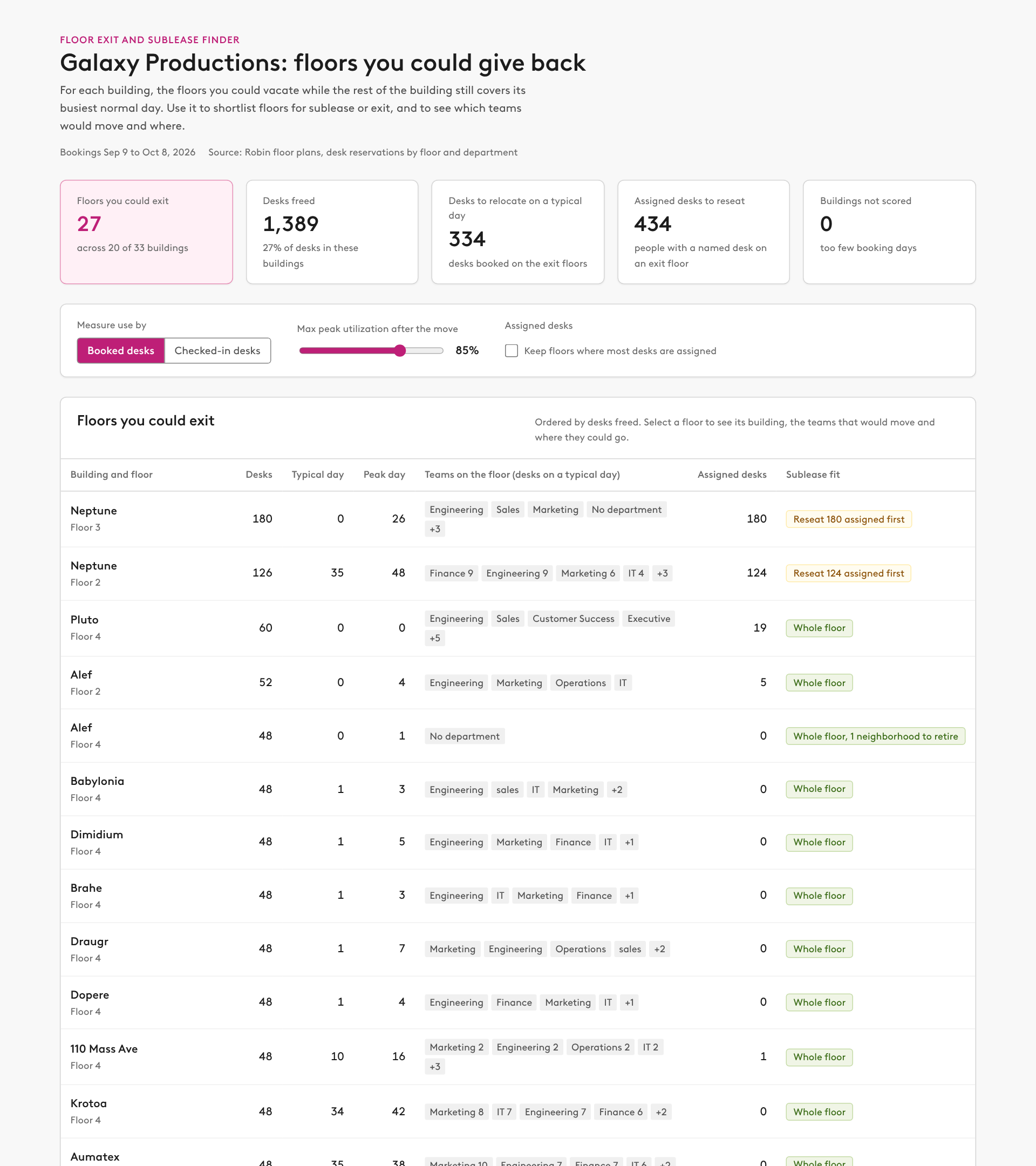
- Summary row: floors you could exit, desks freed, desks to relocate on a typical day, assigned desks to reseat, and buildings not scored.
- Controls: a toggle for booked or checked-in desks (default booked), a slider for maximum peak utilization after the move (60 to 95%), and a checkbox to keep floors where most desks are assigned. Each control recalculates everything.
- A table of every floor you could exit, sorted by desks freed: building and floor, desks, typical day, peak day, teams on the floor, assigned desks, and sublease fit. Selecting a row opens that building below.
- A building view with a building picker:
  - A stack of floors, top floor first, with bars sized by desks that show typical and peak day, and the exit floors hatched.
  - A check showing the building peak day against the desks you keep, with the maximum marked.
  - Next to it, an "After the move" stack with the same floor order and scale. Show exit floors as vacated with desks freed and where their teams go. For each kept floor, draw one bar with the people already there on the peak day in gray, then one colored segment per incoming team, a marker for the maximum, and the resulting peak utilization. List the incoming teams under each bar with a color key, the desks they bring, and the floor they come from.
  - Below both, the move plan grouped by destination floor: one card per kept floor that receives people, listing each incoming team, where it comes from, how many of its colleagues already sit there, and desks a day. Then list the assigned desks to reseat and the neighborhoods to retire.
- A "How to read this" section that explains each calculation, and a "Data notes" section for excluded floors and skipped buildings.

Rules
- Say that booked desks include no-shows, and that checked-in desks undercount where check-in is not required, which is common for assigned desks.
- Report floors and departments only. Do not show individual names.
- Present destinations as a starting point for a seating draft in Robin, not a final plan.