Hybrid policy adherence
See how attendance compares with your hybrid policy across teams and buildings.
Prompt
Using the Robin connector, build a hybrid policy adherence report for every building with desk bookings and publish it as an artifact using our design system. Only read from Robin. Our policy is at least [POLICY DAYS] days a week, starting [POLICY START], with [RECOMMENDED DAYS] as recommended days. The page lists each person, so keep it private and share it only with the people who handle attendance (HR and, if you choose, managers for their own teams). Check local rules on monitoring attendance before sharing it, especially in the EU.

Pull the data (the last [WEEKS] completed weeks)
1. For each building, desk check-in days grouped by department, person and week (desk_checkin_days_count with reservation__assignee_department, reservation__assignee_id and metric_time__week; split by department if a result is truncated). Keep one row per person: name, department, building (where they checked in most) and days checked in each week. Look up names with find_people. People who booked in the building during the window but never checked in count as 0 every week.
2. Desks used per day grouped by department and weekday, for the share of office days on recommended days.
3. Workspace desks per building from the building overview.
4. Holidays in the window: [HOLIDAYS].

Calculate
- A person meets the policy in a week if they checked in on at least the policy days; in a holiday week, the bar drops by the number of holidays (a setting can turn this off).
- Share meeting it and average days a week, per week and for the chosen period, overall and per team or building. Compare with the weeks before the policy started, in percentage points.
- Team status against the goal: on track at or above it, getting there within 20 points, behind beyond that.
- Person status over the period: meeting it if they met the policy in at least 75% of weeks, some weeks at 50 to 75%, not meeting it below that, and no check-ins if they had none.

Build the page
- Settings: policy days (1 to 5), period (last 4 weeks, since the policy started, all weeks), group by team or building, goal (60 to 90% meeting it), whether people with no check-ins count, and whether holiday weeks lower the bar.
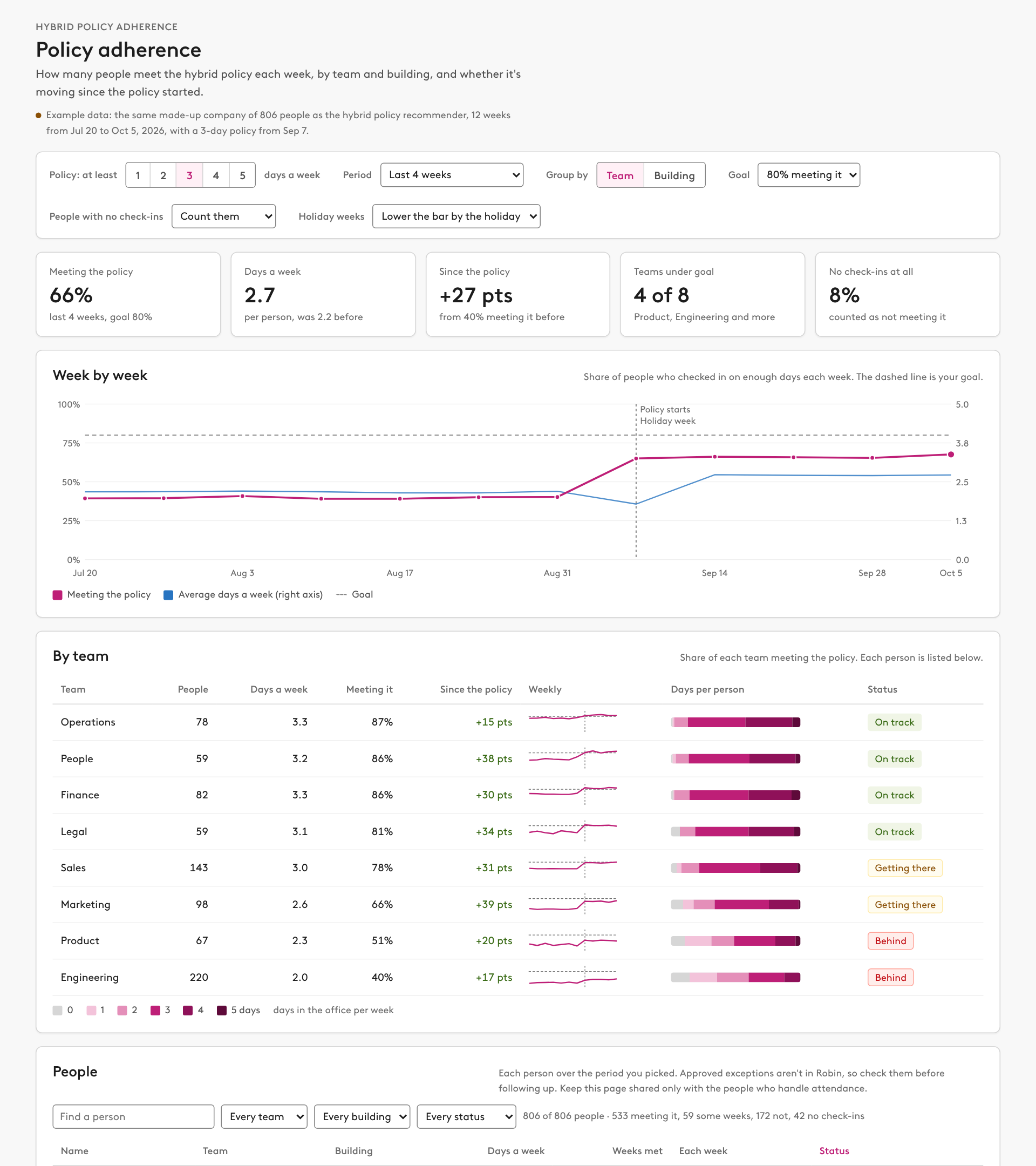
- Five tiles: share meeting the policy, days a week now and before, change since the policy, teams under goal, and the share with no check-ins.
- A weekly line chart of the share meeting the policy, with average days a week on a second axis, the goal line, the policy start and holiday weeks marked.
- A table per team or building: people, days a week, share meeting it, change since the policy, a weekly sparkline, a bar of people by days, and status.
- People: a table of everyone with team, building, days a week, weeks met out of the period, a square per week (met, came in but short, not in) and status. Search by name, filter by team, building and status, sort by name, days or status, show 25 at a time, and "Copy this list" to paste the filtered list into a spreadsheet.
- Which days people choose: per building, attendance by weekday with the recommended days highlighted (editable) and the share of office days on them. Say that recommended days are suggestions and Robin counts how many days, not which.
- Before and after: people by days a week before the policy and in the period.
- A leadership summary in plain language with a copy button. It names teams, not people.

Rules
- Say that check-ins come from badge swipes, Wi-Fi, desk QR codes or remote check-in, the same signal as Robin's hybrid policy banner, and that approved exceptions aren't in Robin.
- Say that approved exceptions need checking before anyone follows up with a person, and that follow-up decisions belong in the HR system.