Manager seating request
Let managers request team seating changes for workplace admins to review and apply.
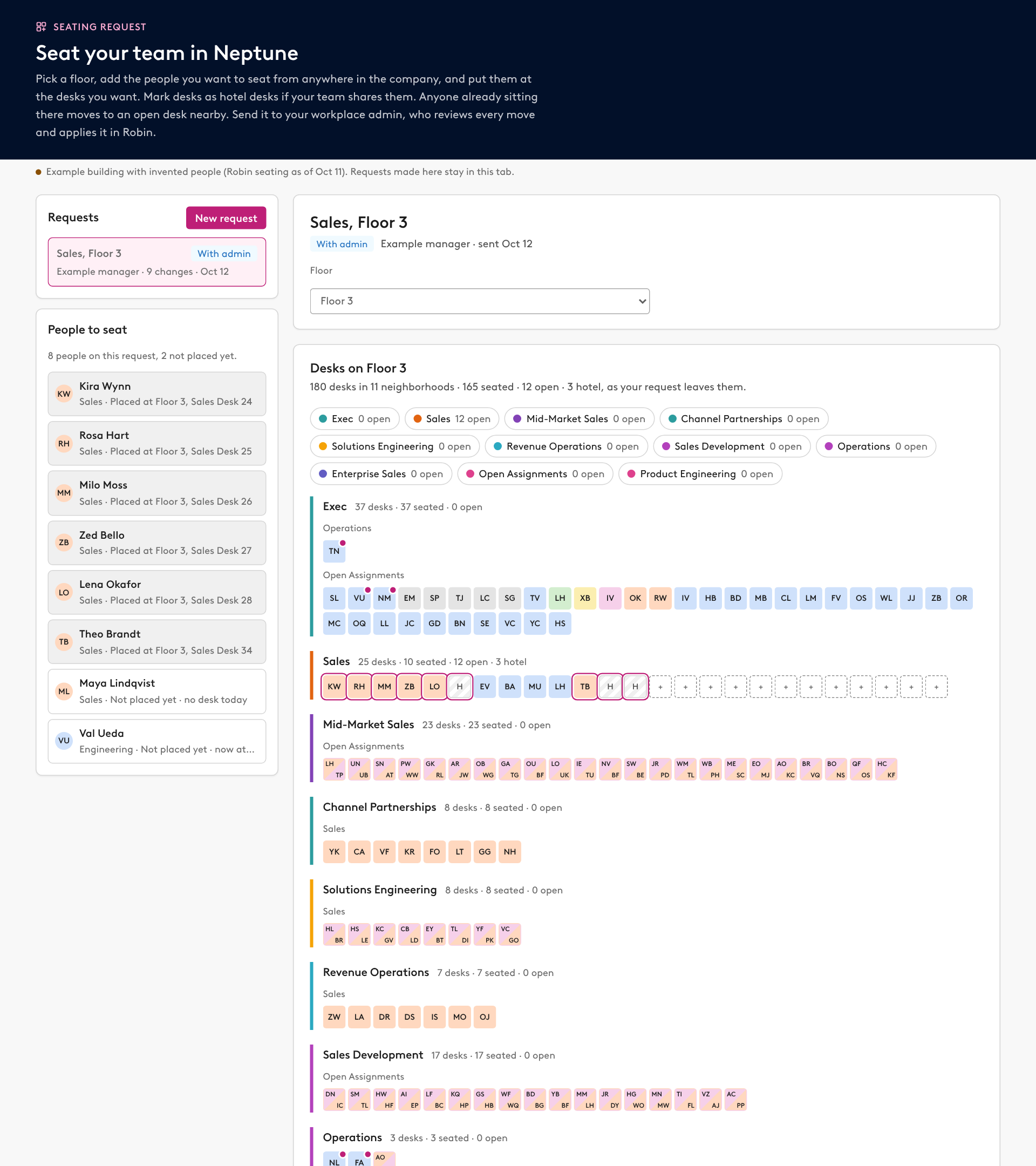
Prompt
Using the Robin connector, build a manager seating request page for [BUILDING] and publish it as an artifact using our design system. Only read from Robin. Nothing on the page writes to Robin.

Data to pull (read-only)
1. get_office_locations for the building id, then get_building_overview with includeNeighborhoods for every floor, its desks by type and its neighborhoods with desk ids.
2. get_building_live_state once, then get_draft_data for each floor: every desk's id, pod, name, booking type, neighborhood and assignees with their weekdays. Use find_desks with levelId only as a fallback.
3. find_people for everyone who sits in the building, plus active and added people with no desk, so managers can seat new hires. Keep name, department and title. Look up any assignee with no department by name.
4. get_neighborhood_colors for the colors Robin draws.
Snapshot all of it into the page and show the snapshot date.

The page
- Give the page the db and user capabilities, plus the mcp capability for Robin (Workplace) with only find_people and search_entities, for the people search. Requests live in a shared "requests" collection: floor, the people on the request, placements (desk id and user id), hotel desk ids, the manager's note, status (draft, with admin, sent back, applied), author id, dates and an admin note. Store user ids only and show names from the user capability.
- A list of requests on the left and a New request button.
- For a request: pick a floor and show every neighborhood on it, in Robin's order and colors, with desks that aren't in a neighborhood last. Each neighborhood shows its desk, seated and open counts, and a row of chips at the top jumps to any neighborhood. Desks are small 28px tiles grouped by pod, with initials colored by department, open desks outlined, hotel and hot desks marked, and the manager's changes ringed. Hovering a desk shows a card with the desk, neighborhood, pod and type, each person's name, department, title and days, and what the request changes there (who moves in, from where, and where today's occupant goes). Managers can drag anyone already seated to another desk too, and the page scrolls while they drag near the edge.
- People to seat, in a sticky panel beside the floor: a typeahead that searches every employee in Robin as the manager types (find_people with the first word as userNameFilter, plus search_entities for USER, merged with the people in the snapshot). Arrow keys and Enter pick a name. Each person shows their department, title and where they sit today. Keep the name, department and title of anyone added from the live search on the request, so admins see them too. Drag a person onto a desk, or tap the person and then the desk. One desk per person. The desk becomes an assigned desk for them Monday to Friday, and their old desk opens up.
- Set hotel desks: tap desks to make them hotel desks, tap again to undo.
- Move displaced people automatically and give the manager no controls for it, only a one-line count. Anyone sitting at a desk the manager takes or makes a hotel desk moves to an open assigned desk outside the neighborhoods being changed: same floor first, then the desk the new person left, then the pod with the most people from their department. They keep their weekdays. If no open desk is left, list them as without a desk.
- Send to admin locks the request. The manager can take it back to edit.
- A review section that everyone can see once a request is sent: counts (people placed, people moved to make room, desk type changes, people without a desk), and a table of every person who moves with from, to and why.
- For people who can edit the page (admins): a note to the manager, Copy draft prompt, Copy publish prompt, Mark applied and Send back. The prompts create a new building draft, first check every listed desk against its "was" state and stop if anything changed, apply the desk changes with update_draft, run review_draft_changes and show bookings that would be cancelled. The publish prompt asks whether to notify the people affected, then publishes after I confirm. List only desks whose state changes, with the new state and what was there.

When it's published, tell me to share it from the Share menu: managers need at least Contributor access to save requests, and admins need Editor access to see the admin actions. Share it only with managers and workplace admins, since it shows where everyone sits.