Booking calendar
See your upcoming office days, book a desk, and check who else is coming.
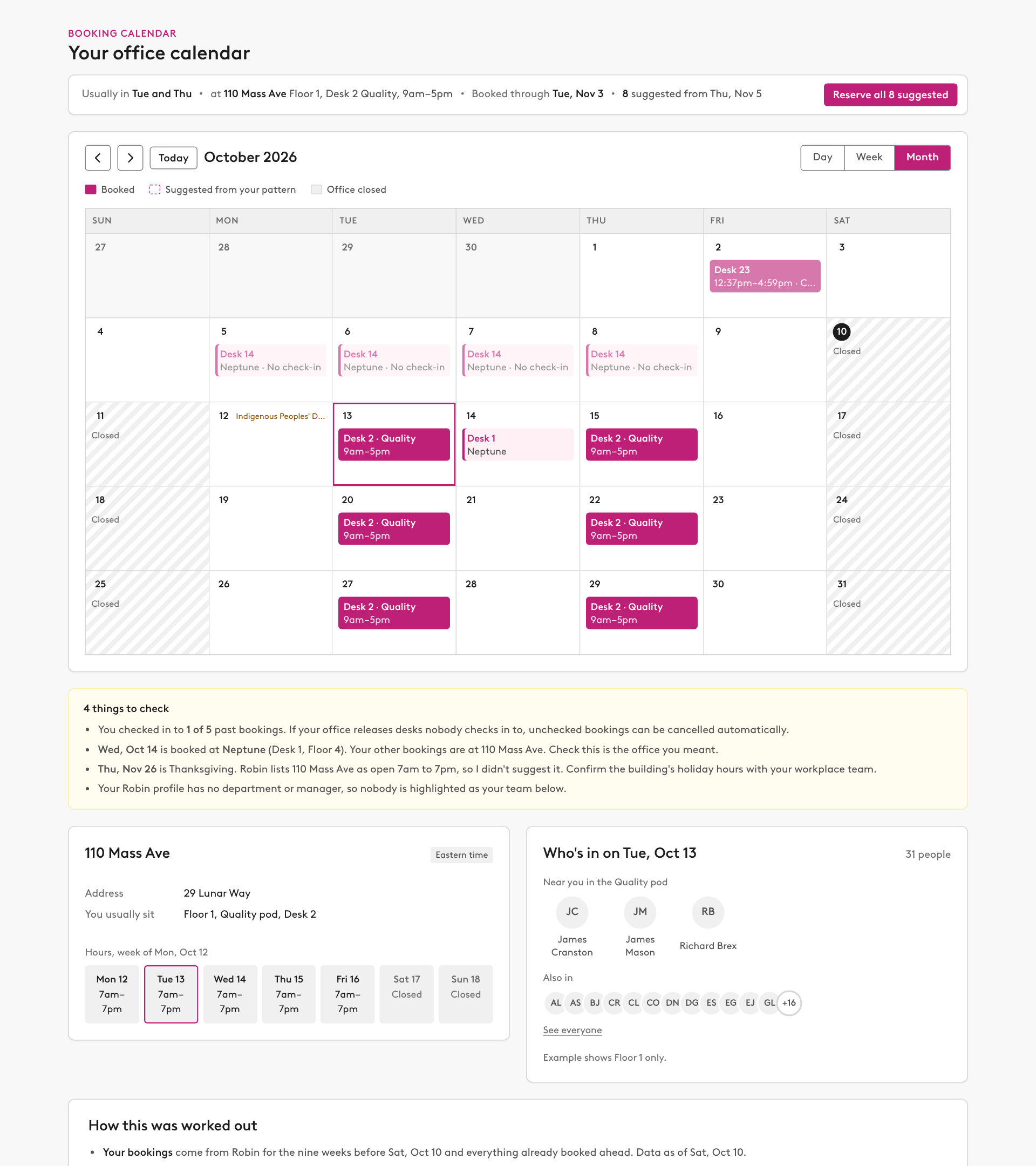
Prompt
Build me a calendar of my upcoming office days from Robin, using our design system. Work everything out from my Robin data; don't ask me for it.

What to pull
- Me: get_current_user_info for my user id, email, default building and today's date. Use find_people with my email to get my department.
- My bookings: get_user_desk_reservations from nine weeks ago to nine weeks ahead.
- My pattern: a weekday counts if I booked it in at least half the weeks I came in. My usual office, floor, desk and hours are the ones I book most on those days.
- The office: get_building_overview for my usual office (floors, desk counts by type, neighborhoods) and get_building_hours for the next eight weeks. Look up public holidays for those weeks too.
- Suggested days: every pattern day I haven't booked, skipping days the building is closed and public holidays. Use check_desk_availability to see whether my usual desk is free on each one.
- Who's in: for the day I'm looking at, list every desk on each floor with find_desks, then run check_desk_availability on them during building hours and read the reservation names. My team is everyone in my department.

Build the page
- The calendar is the main focus. Above it, keep only a one-line strip with my pattern, usual office and desk, how far ahead I'm booked and how many days are suggested, plus a "Reserve all suggested" button.
- A calendar with Day, Week and Month views. Month is the default.
  - Booked days should stand out at a glance: solid color with the desk and time.
  - Suggested days get a dashed outline and a Reserve button. Closed days are shaded.
  - Week view shows each day on a 7am to 7pm timeline.
  - Clicking a day opens Day view with my reservations for that day. If I have none, show a "Book a desk" button.
  - In Day view, add a small, low-key link to book a desk for someone else.
- Right below the calendar, a "things to check" box for anything that looks off. For example: bookings I never checked in to, a booking at a different office than usual, a holiday when Robin says the building is open, no department on my profile,.
- Then office information written for an employee, not an admin: address, description (only if one is set), time zone, hours for the week and where I usually sit. Leave out floor counts, desk types and setup details.
- Below that, who else is in on the selected day, kept light: a count, my team and the people in my pod as photos with names, then everyone else as a row of small photos with "See everyone" to expand into a searchable list. Use profile photos from search_entities (avatarUrl) and fall back to initials when a photo won't load. No desk numbers, pods lists or admin details.

Booking
- Book inline. Give the artifact live access to the Robin connector with the mcp capability, using the connector's exact display name (for example "Robin (Workplace)"), and these tools: get_current_user_info, get_user_desk_reservations, get_building_overview, get_building_hours, find_desks, find_available_desks, check_desk_availability, book_desk, find_people and search_entities.
- When the page opens, refresh everything from Robin so it's current.
- Every booking opens in an overlay with a confirm step. Run check_desk_availability first, then book_desk with the bookAs type it returns. If Robin says no, show its reason.
- "Reserve all" lists every suggested day in the overlay. If my usual desk is taken on a day, pick the closest free desk, same pod first. Book each day and show the result for each one.
- To book for someone else: search people with find_people, check availability for that person's user id, then book with forUser set to their email. Say that this needs delegate permission in Robin.
- Never book anything without my click. If the connector isn't available, show the calendar read-only and say how to turn booking on.