Team onsite planner
Coordinate your team’s office days, desks, activities, and food in one shared page.
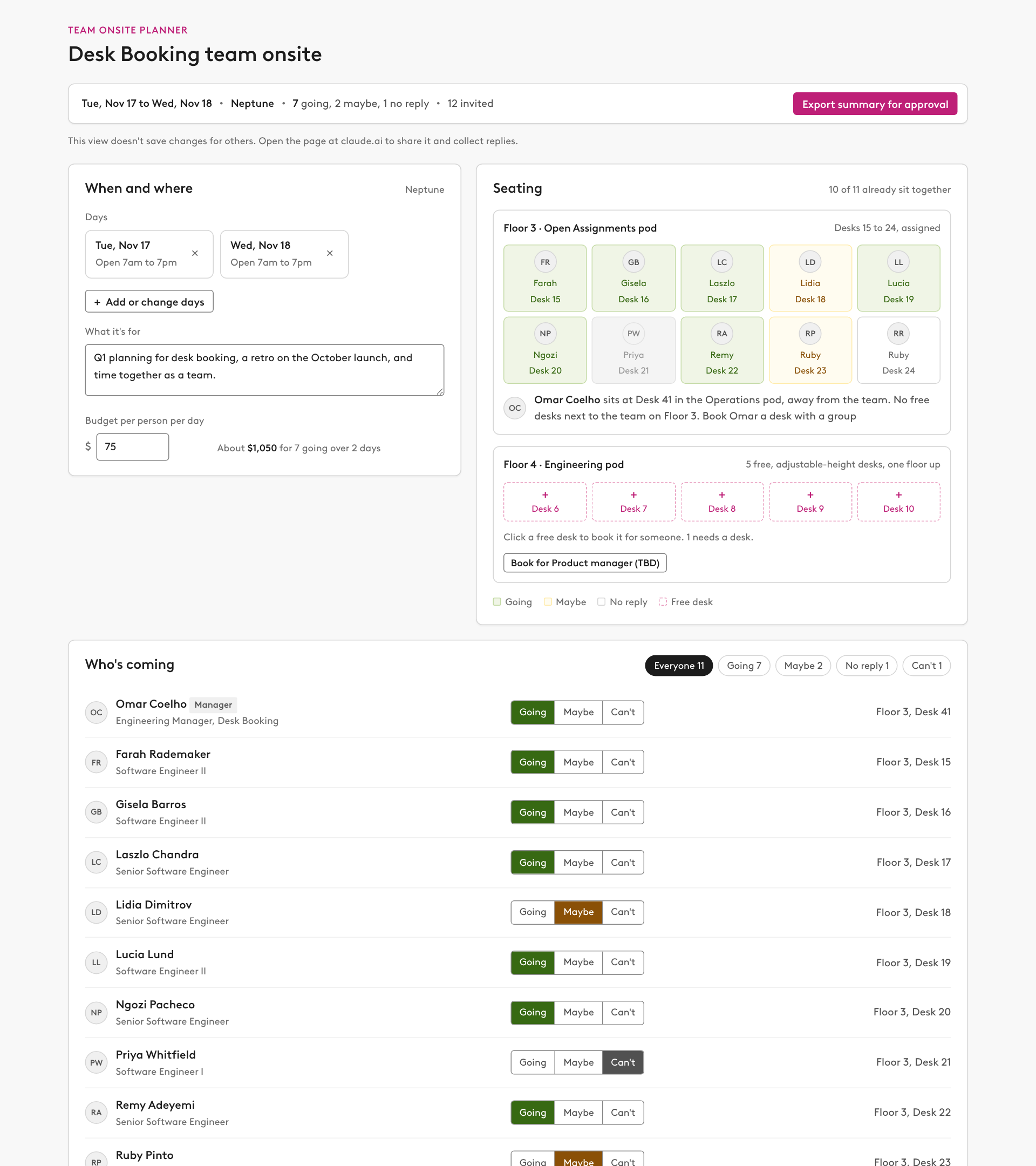
Prompt
Build a shared team onsite planner from Robin, using our design system. Work out the team and seating from Robin yourself; don't ask me for them.

What to pull
- The team: get_current_user_info for me, then find_people with managerIds set to my id. If nobody reports to me, use my manager's team: their direct reports plus the manager. If Robin has neither, show a search to pick the team's manager.
- Seating: for each person, get_user_desk_reservations on the onsite days to see their desk, floor and building. Use find_desks on the team's main floor to get each desk's pod by desk id. Work out the pod where most of the team sits.
- Room for others: find_available_desks on the team's floor first, then the building's other floors (get_building_overview), and pick the pod with the most free desks together.
- Hours: get_building_hours for the onsite days. Flag any day the building is closed.
- Days: pick them with an in-page week picker (Monday to Friday buttons with week arrows), not a native date input.

Build the page
- A title I can edit, then a one-line strip: dates, office, how many are going, how many invited, and an "Export summary for approval" button.
- When and where: the onsite days (add and remove), building hours for each, what it's for, and a budget per person per day with a running total for the people going.
- Seating: the team's pod as a row of desks with initials, colored by reply (going, maybe, no reply). Call out anyone who sits away from the team. Show the nearest free desks (the team's floor first, then the closest floor by number) for guests or anyone without a desk. Make the map clickable: a person's seat opens their reply and a "book a different desk" option, and a free desk asks who it's for, then books it.
- Who's coming: everyone on the team with Going, Maybe and Can't buttons, filter chips by reply, and their desk. The organizer can add guests.
- Activities and food: start with one example idea that can be removed, and a clear "Add your first ideas" box at the top (activity or food, then the idea). Show ideas in two columns. Anyone can add and vote; people can remove their own ideas, and the organizer can remove any and mark the ones they're going with.
- A short "things to check" box: days the building is closed, people sitting apart, who hasn't replied, and a reminder to book meeting rooms in Robin, since the connector can't book rooms.
- Export: a plain-text summary for my approver with dates, place, headcount by reply, budget, purpose, picked ideas, popular ideas, seating, desks booked, replies by name and what's still to do. Offer download as .md and copy.

Sharing and booking
- Save replies, ideas, votes, guests and bookings with the db capability so everyone who opens the page sees the same plan. Use the user capability so each person votes once and only the organizer edits the plan and picks ideas. Each person sets their own reply; the organizer can set anyone's. Match the viewer to the roster by their Robin id, or by their name (user capability with the profile scope) if they haven't connected Robin, so anyone the page is shared with can reply and vote.
- Give the page live access to the Robin connector with the mcp capability, using the connector's exact display name (for example "Robin (Workplace)"), and these tools: get_current_user_info, find_people, get_user_desk_reservations, find_desks, get_building_overview, find_available_desks, get_building_hours, check_desk_availability and book_desk.
- Booking opens in an overlay. Check each onsite day with check_desk_availability for that person, then book_desk with the bookAs type it returns, using forUser for anyone other than me. Say that booking for others needs delegate permission in Robin. For a guest, find them in Robin first; for someone outside the company, point to Robin visitors instead.
- Never book anything without a click. If the connector or database isn't available, show the plan read-only.